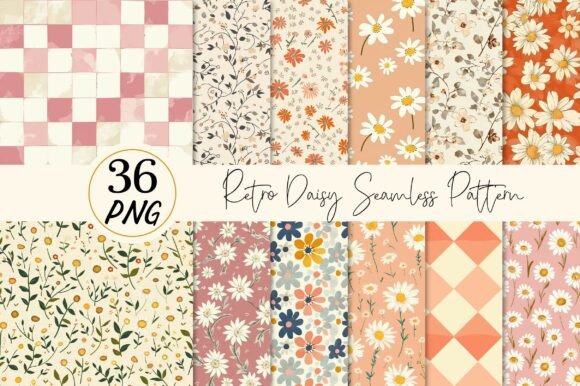
Unlocking the Potential of Your Retro Daisy Seamless Pattern Collection
There is a distinct charm in floral motifs that harken back to the 1970s, where bold shapes and warm palettes defined an era of design freedom. When you acquire a Retro Daisy Seamless Pattern collection, you are not just buying images; you are investing in a versatile toolkit for creativity. However, many creators, from hobbyists to small business owners, often stumble when integrating these digital assets into their workflows. The difference between a professional-grade product and a disappointing result often lies in understanding the technical specifications and avoiding common pitfalls related to resolution, file formats, and usage rights.
This guide aims to walk you through the nuances of working with high-quality digital patterns, specifically focusing on collections that offer solid color distressed effects. By addressing frequent misunderstandings early, you can ensure your final products—whether they are stickers, t-shirts, or wall decor—look exactly as you envisioned.
Understanding the Value of High-Resolution Distressed Textures
The appeal of a Retro Daisy Seamless Pattern often comes from its texture. A flat, vector-style flower looks clean, but it lacks the soul of vintage print. The "distressed effect" mentioned in premium collections adds a layer of authenticity, mimicking the wear and tear of old screen prints or faded fabric. This aesthetic is currently trending in home decor and fashion, making it a valuable asset for entrepreneurs looking to capture a specific market vibe.
However, a common mistake occurs when users assume all "retro" files are created equal. Many free or low-cost downloads suffer from poor resolution. If you attempt to print a low-resolution image on a large format like a frame artwork or a t-shirt, the result will be pixelated and blurry. The collection you are considering offers files at 300 dpi (dots per inch) with dimensions of 12×12 inches. This is the industry standard for high-quality printing. Ignoring this specification and trying to stretch a smaller web graphic (usually 72 dpi) to fit a physical product is the fastest way to ruin a project. Always verify the DPI before you begin designing.
Navigating File Formats and Transparency
One of the most overlooked details in digital design is the file format. You will receive these designs as PNG files. For those new to digital assets, it is crucial to understand why this matters. Unlike JPEGs, which always have a solid background (usually white), PNGs support transparency. This feature is vital if you plan to place your daisy patterns on colored t-shirts, dark scrapbook paper, or varied cardstock backgrounds.
A frequent error involves users opening PNG files in software that does not properly render transparency, leading them to believe the file has a white box around it. They might then spend hours trying to remove the background manually, wasting valuable time. The better approach is to use software that supports layers, such as Photoshop, Procreate, or even free alternatives like GIMP or Canva (with proper upload settings). Before purchasing or downloading, ensure your workflow can handle transparent backgrounds. If you are printing on demand, check that your mockup generator accepts PNGs; otherwise, your "transparent" design might appear on a square white tile, ruining the seamless look.
The Trap of Improper Resizing and Scaling
While the description notes that these files are "easy to resize," there is a limit to how much you can manipulate raster images (pixels) versus vector images. A Retro Daisy Seamless Pattern provided as a PNG is a raster image. You can scale it down significantly without issue, which is perfect for stickers or cards. However, scaling it up beyond its original 12×12 inch canvas at 300 dpi will degrade the quality.
Many beginners make the mistake of dragging the corner of an image in their design software to fill a massive wall mural, assuming the computer will "fix" the quality. It won't. Instead, the distressed texture will turn into blocky noise. To avoid this, stick to the intended use cases. These 12×12 inch tiles are ideal for:
- Scrapbooks and Planners: Perfect size for page backgrounds.
- Greeting Cards: High detail ensures crisp edges when cut.
- T-Shirt Prints: Excellent for chest logos or all-over sublimation prints within the 12-inch limit.
- Stickers: The 300 dpi resolution ensures no jagged edges when die-cut.
If you need a pattern for a billboard or a full-size bedsheet, you must look for vector files (SVG or EPS) or ensure you are tiling the seamless pattern correctly in your software rather than stretching a single tile.
Color Accuracy and Device Variations
An essential reality check for anyone selling physical goods involves color management. The note stating "colors may vary depending on devices and printers" is not just a disclaimer; it is a critical warning. What you see on your vibrant, calibrated monitor may look duller or shift in hue when printed on a cotton t-shirt or glossy sticker paper.
To mitigate dissatisfaction, always order a sample before launching a full product line. Do not rely solely on digital mockups. If you are using a print-on-demand service, utilize their physical proofing options. Furthermore, understand that the "Solid Color Distressed Effect" relies on contrast. If you print a light yellow daisy on a white shirt, the distressed details will vanish. Always test your patterns against the actual base color of the product you intend to sell. This simple step saves money on returns and protects your reputation as a seller.
Maximizing the Versatility of Your Download
With 36 designs included in this pack, the temptation is to use them all at once. However, a more strategic approach yields better results. Curate your designs based on the season or the specific audience. For instance, warmer tones might perform better in autumn marketing campaigns, while brighter, high-contrast daisies could suit spring collections.
Additionally, consider the "seamless" nature of these files. In software like Photoshop or Illustrator, you can define these images as patterns and fill entire canvases of any size without visible seams. This is a powerful technique for creating custom wrapping paper, website backgrounds, or fabric prints. Failing to utilize the seamless capability limits the utility of your purchase. Take the time to learn how to set up a pattern swatch in your preferred design tool; it transforms a static image into an infinite resource.
Final Checklist Before You Create
Before you dive into your next project, take a moment to review your setup. Ensure you have the right software to handle PNG transparency. Confirm that your canvas size matches your output needs without requiring excessive upscaling. Remember that this is a digital instant download; no physical item is coming in the mail, so your preparation is key to success.
By respecting the technical limits of the files and leveraging the high-quality distressed textures effectively, you can create stunning wall decor, unique frame artwork, and memorable merchandise. The Retro Daisy Seamless Pattern is a robust foundation for your creativity, provided you approach it with the right knowledge. Avoid the rush, check your resolutions, and let the vintage aesthetic elevate your brand with professionalism and style.